Wednesday, 31 October 2012

Magento : useful functions list

General functions

Function
$this->getRequest()->getServer(‘HTTP_REFERER’);

Product related functions

Function
$product->getName()
$product->getSku()
Mage::getModel(‘cataloginventory/stock_item’)->loadByProduct($_product)->getQty()
$product->getResource()->getAttribute(‘color’)->getFrontend()->getValue($product)
$product->isSaleable()
$product->isisAvailable()
Mage::getModel(‘catalogrule/rule’)->calcProductPriceRule($product,$product->getPrice())
$product->getTierPrice(1)

Newsletter related functions

Function
$subscriber = Mage::getModel(‘newsletter/subscriber’);
$subscriber->subscribe($user_mail);

Cache

Function
$tags = array(Mage_Catalog_Model_Category::CACHE_TAG); //Category block tag
Mage::app()->cleanCache($tags)

Product images

Function
$_product->getMediaGalleryImages()->getItemByColumnValue(‘label’, ‘LABEL_NAME’)->getUrl()

Customer related functions

Function
$this->helper(‘customer’)->isLoggedIn()

Magento: Very Useful Collection Functions

/**
 * Get Zend_Db_Select instance
 */
$collection->getSelect();
 
/**
 * Get collection size
 */
$collection->getSelect()->getSize();
 
/**
 * Get sql select string or object
 */
$collection->getSelect()->getSelectSql();
 
/**
 * Add select order
 */
$collection->getSelect()->setOrder($field, $direction);
 
/**
 * Add field filter to collection
 *
 * If $attribute is an array will add OR condition with following format:
 * array(
 *     array('attribute'=>'firstname', 'like'=>'test%'),
 *     array('attribute'=>'lastname', 'like'=>'test%'),
 * )
 */
$collection->getSelect()->setOrder($field, $condition);
 
/**
 * Set select distinct
 */
$collection->getSelect()->distinct($flag);
 
/**
 * Get all data array for collection
 */
$collection->getSelect()->getData();
 
/**
 * Reset loaded for collection data array
 */
$collection->getSelect()->resetData();
 
/**
 * Print and/or log query
 */
$collection->getSelect()->printLogQuery(true, true);
More functions below:-
Varien_Data_Collection_Db class extends Varien_Data_Collection class. Here are some more functions present in Varien_Data_Collection class:-
/**
 * Get current collection page
 */
$collection->getSelect()->getCurPage();
 
/**
 * Retrieve collection last page number
 */
$collection->getSelect()->getLastPageNumber();
 
/**
 * Retrieve collection page size
 */
$collection->getSelect()->getPageSize();
 
/**
 * Retrieve collection all items count
 */
$collection->getSelect()->getSize();
 
/**
 * Retrieve collection first item
 */
$collection->getSelect()->getFirstItem();
 
/**
 * Retrieve collection last item
 */
$collection->getSelect()->getLastItem();
 
/**
 * Retrieve collection items
 */
$collection->getSelect()->getItems();
 
/**
 * Clear collection
 */
$collection->getSelect()->clear();
You can also use the select functions as present in Zend_Db_Select class. This class file is present in lib/Zend/Db/Select.php

Tuesday, 9 October 2012

Magento :: get URL paths for skin, media, Js OR base URL

If anyone of you facing problems to fetch the Magento URL paths of  skin, media, Js or simple base URL of Magento while customization/programming, then following lines should be helpful for you:
Mage::getBaseUrl(Mage_Core_Model_Store::URL_TYPE_JS);
//http://magento.demo/js/
Mage::getBaseUrl(Mage_Core_Model_Store::URL_TYPE_LINK);
//http://magento.demo/index.php/
Mage::getBaseUrl(Mage_Core_Model_Store::URL_TYPE_MEDIA);
//http://magento.demo/media/
Mage::getBaseUrl(Mage_Core_Model_Store::URL_TYPE_SKIN);
//http://magento.demo/skin/
Mage::getBaseUrl(Mage_Core_Model_Store::URL_TYPE_WEB);
//http://magento.demo/

Wednesday, 26 September 2012

Change any page title in Magento

In page/html/head.phtml template replace default

<title>< ?php echo $this->getTitle() ?></title>
with
<title>
<?php echo ($this->getForcedTitle()) ? Mage::getStoreConfig('design/head/title_prefix').' '.$this->getForcedTitle().' '.Mage::getStoreConfig('design/head/title_suffix') : $this->getTitle() ?>
</title>


and now just set “forced” title for pages through layout files

<reference name="head">
<action method="setForcedTitle"><title>Account Dashboard</title></action></reference>
Example for My Account page in layout/customer.xml:
<customer_account>
<reference name="head">
<action method=”setForcedTitle”><title>Account Dashboard</title></action>
</reference>
…
</customer_account>

Remove ‘My Orders’ box in magento

Try to look into sales.xml:

<customer_account>
        <!-- 
Mage_Sales -->
        <
reference name="customer_account_navigation">
            <
action method="addLink" translate="label" module="sales"><name>orders</name><path>sales/order/history/</path><label>My Orders</label></action>
        </
reference>

    </
customer_account>

Friday, 21 September 2012

Enable Template Path Hints in Magento

emplate Path Hints is the one of the most Use full Feature in Magento for the Magento Developer and Designer .It Helps to show the Phtml file's path.For example:- if you want to Modify header of a Magento template then Template Path Hints will help you to find the actual location where the Phtml file located. To show the Template Path Hints you need to
log in to the admin panel of your Magento site
Go to System tab ->From the drop down select Configuration
select Main website from the left top Current Configuration Scope
scroll down towards footer there you will find Developers -> Click on it and again scroll up to wards Header.
Expand the Debug Tab
Set Template Path Hints to Yes. Now got to your Frontend and refresh your page You will see all the path hints of your template

how to change theme in magento

To change theme of Magento you need to login to your admin panel.There is two way to change it
1) Go to System->Design .Click on Add Design Change ,there from Custom Design click on the DropDown to select your Design , then save it to change your theme
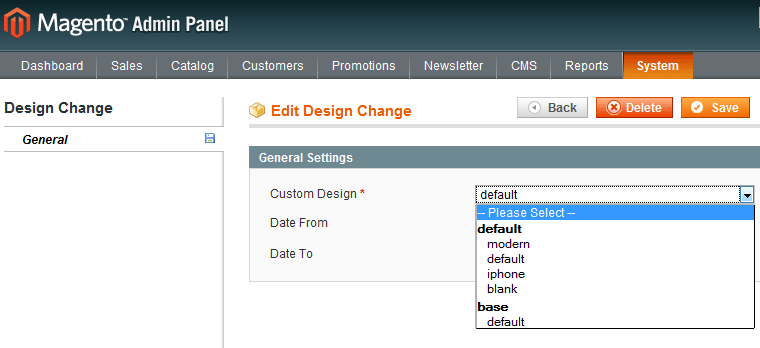
Change theme in Magento

2) Go to System->Configuration then click on Design,there from Themes Tab you can change your theme.Write your theme name in Templates and Skin (Images / CSS) Field. then click on save Config to save your theme.
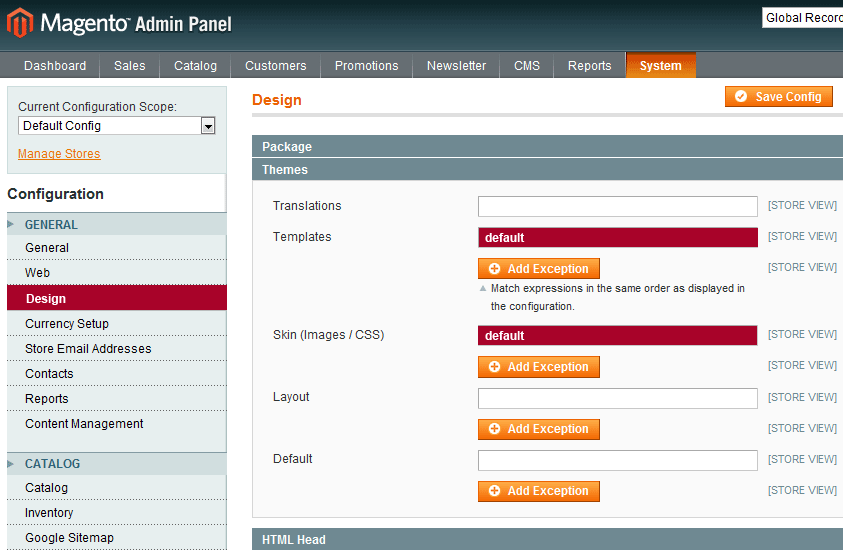
Change theme in Magento

If you don't know you theme name then it is beter to choose First option,Because it is much easier than the second one.One more thing that if you have two store and you want to make 2 different Theme for that two store than you have to follow the first process.